

If you’re like most people, you hardly ever use paper checks anymore. It’s much easier to make purchases with a debit card or payment app, use online banking to pay bills, and receive your paycheck by direct deposit.
But to set up all those electronic transactions in the first place, you need to provide your bank account information to other parties. And for that, ironically, a paper check can be very useful. In many cases, the easiest way to send someone else your banking info is with a voided check.
What Are Voided Checks?
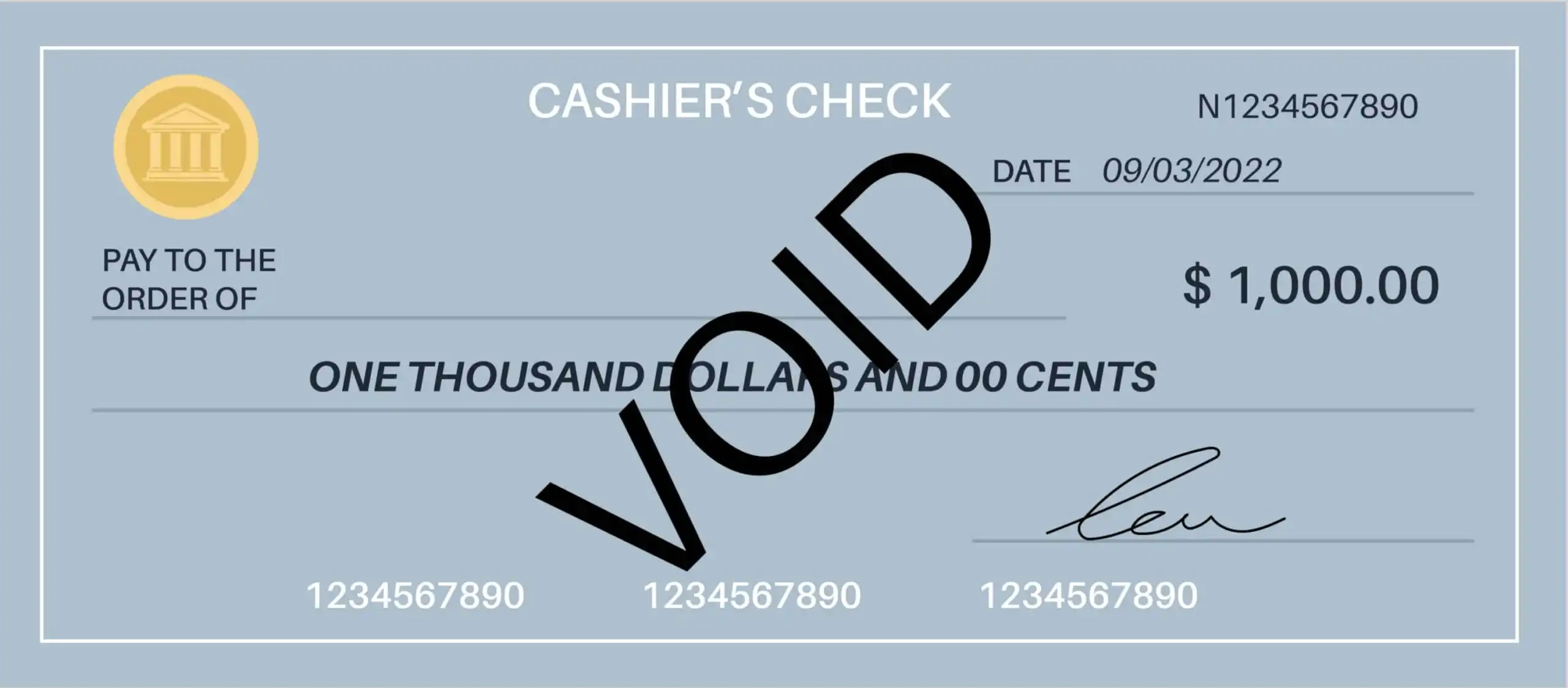
A voided check is simply a personal check with the word “void” across the front. Marking a check “void” means it’s no longer valid for payment. No one can fill it out, deposit it, or cash it.
There are two ways to void a check, both equally valid. One is to write “void” in big letters across the entire front of the check. The other is to write it in smaller letters in each field of the check: the date line, payee line, amount line, amount box, and signature line.
How Do Voided Checks Work?
A voided check may seem useless, since no one can cash or deposit it. However, the banking information on the check is still usable. This information includes:
- The name of your bank or credit union
- The bank’s routing number, also known as the ACH number
- Your bank account number
Thus, sending a voided check is a simple way to provide your banking details to someone else so they can set up electronic payments.
Of course, you could provide the same information by sending a blank check without voiding it first. However, blank checks are dangerous things to have floating around. Anyone who manages to get their hands on one could simply make it out to themselves and cash it.
By voiding the check first, you eliminate any risk that someone else will use it to take money out of your account.
When Do You Need to Void a Check?
There are several possible reasons to void a check:
- To Set up Direct Deposit. Many businesses use direct deposit to send paychecks and expense account payments to employees. You can also receive benefit payments from the government this way. However, to send these payments, the payors need your bank account information. Sending a voided check is one way to provide it.
- To Arrange Electronic Payments. Individuals can use electronic payments, also called direct debits, to pay bills. Business owners can use them to send money to vendors. For both purposes, a voided check provides your account information to the payee.
- To Make Automatic Payments. Some bills, such as monthly rent or car payments, are the same amount every month. For these, you can set up automatic payments from your checking account so you never forget to pay. A voided check can provide banking details for this type of payment as well.
- To Fix a Mistake. Sometimes, when writing a check, you make a mistake like entering the wrong amount or the wrong name. If this happens, you can void the check before discarding it. Then there’s no risk anyone will fish it out of the bin and try to cash it.
Note that there’s no way to void a check if you discover a mistake after sending the check to the payee. At that point, your only option is to ask the bank or credit union to stop payment on the check. Banks usually charge a fee for this service.
How to Void a Check
Voiding a check is a simple process. All you need is a check and a blue or black pen — ideally, one that produces a nice, thick line that’s impossible to miss.
1. Mark the Check “Void”
Write “void” in large letters across the front of the check.
The word “void” doesn’t have to cover the whole face of the check, but it should cover enough to make it unusable. However, make sure to leave the routing number and account number at the bottom of the check visible.
Make the lines in the word “void” as dark and heavy as possible so there’s no way a thief can erase or cover them up. If the pen you’re using can’t put down a dark enough line, double the line to make it thicker.
Alternatively, you can write “void” in each field of the check separately.
2. Enter the Voided Check in Your Check Register
Enter the voided check in your check register. Write down the check number and the date, and under “transaction description,” just write the word “void.” Enter a zero or a dash for the amount of the check.
It may seem pointless to enter a check that no one will ever cash, but it will save you hassle later on. When it comes time to balance your checkbook, you won’t drive yourself crazy trying to remember why there’s a missing check number and what happened to the check.
3. Send or Discard the Check
If you’re using the check to set up direct deposit or automatic payments, send it to the recipient. If the company is willing to accept a copy rather than the original check, you can fax or scan it instead of mailing it. Then you can discard the original check.
If you voided the check to correct an error, just put it in the shredder. If you don’t have a shredder, at least tear up the check before throwing it away. Even though it’s voided, identity thieves could steal it from your bin and use it to get your bank account information.
Alternatives to Voiding a Check
Sending a voided check isn’t the only way to set up electronic payments. If you don’t have a checking account, you can use one of these other methods.
Send Your Banking Information Electronically
If you’re setting up bill payments through online banking, you don’t need a voided check. Your online banking portal already has your account information. All you need to do is provide the payee’s name.
If you want to send payments through a payee’s online portal, rather than your bank’s, you can probably provide your bank account information electronically as well. For instance, to send a payment from your checking account to your auto insurance company, you could enter your account information directly on its website. Just make sure the website is secure first.
Similarly, if you use an online-only bank, you don’t need a voided check to link your online bank account to an external account. You can just type the name, routing number, and account number into a secure online portal.
Direct Deposit Authorization Form
Some employers don’t require a voided check to set up direct deposit. Instead, they provide a direct deposit authorization form. You write in the bank’s name and routing number and your account number by hand.
If you use one of these forms, double-check to make sure you got all the information right before submitting it. If you make a mistake, you won’t get your paycheck as scheduled. Worse, the money could go into someone else’s account and you might be unable to recover it.
Use a Printed Deposit Slip
Some companies allow you to set up payments or direct deposits with a deposit slip for your checking or savings account. This slip contains the same account information as a check.
If you have a checking account, there’s a good chance you have a few pre-printed deposit slips tucked behind the checks in your checkbook. If not, you can get a deposit slip from the bank and fill in your account number by hand. Again, double-check the number before sending it.
Send a Photocopy of a Check
Companies don’t always need an original check to get your account information. Some companies allow you to scan or copy a check or deposit slip and send that instead.
This doesn’t pose the same risk as sending a blank check because banks don’t accept photocopied checks. However, someone could still copy your account information and try to authorize a transfer out of your account.
Use a Voided Counter Check
A counter check is a check printed on demand at the bank. It’s similar to the sample or starter checks you get when you first open a checking account.
You can request a counter check with your account information from the teller at any branch of your bank. Then you can void it just like a personal check. However, most banks charge a small fee for counter checks, so it’s cheaper to use your own check if you have one.
Get a Letter from the Bank
If you don’t have either a check or a deposit slip, you can ask your bank to write an official letter containing your account number and routing number. Then you can hand over that letter instead of a voided check.
However, not all businesses are willing to accept a bank letter as proof of your banking details. Check with the company before getting one to make sure it’s acceptable, and check with your bank to see if they charge a fee to draft the letter.
Final Word
In today’s increasingly digital world, a voided check seems like a rather quaint way to send your banking information. However, there are advantages to using one rather than sending your information electronically.
For one, it eliminates errors. Your account number and the bank’s routing number are preprinted on the check, so there’s no risk a slip of the finger will result in a payor or payee getting the wrong information.
It also reduces the chances of fraud. Online, an Internet scammer might find a way to enter their banking information in place of yours and intercept your paycheck. But a check with your name and banking details preprinted on it is much harder to fake.
In short, voided checks — like checks themselves — aren’t obsolete quite yet. Someday they may be, but for now, they still serve a useful purpose.

Editorial & Advertiser Disclosure: The editorial content on this page is not provided, commissioned, reviewed, approved, or otherwise endorsed by any advertiser. Opinions expressed here are ours alone, not those of any advertiser. The offers that appear on this site are from companies that compensate us. That compensation may influence which products we cover and where and how they appear on a page – including the order in which they appear – but it does not influence our evaluations, ratings, or opinions. We do not include every company or offer available in the marketplace.
Related: