



Use one personal finance app for each money job, such as budgeting, spending, investing, and cutting bills, and choose each by its yearly cost and how it makes money. A free app still earns money from someone, so learn who pays for it before you link your accounts.
Even a free app that millions used can go away. Intuit shut down Mint, its budgeting app, and invited its users to Credit Karma. So for each pick, this list says whether it makes money from your subscription, from businesses that pay it when you buy or trade, or from an upgrade it sells you.
Each one is the app worth keeping for its job, judged by what it costs a year and what it does that your bank’s own app doesn’t.
Best for budgeting: Quicken Simplifi

Quicken Simplifi builds one spending plan from every account you link, not just one bank’s, and projects your cash flow. Quicken sells it only as an annual subscription.
- What Sets It Apart: 12-month cash flow forecasting; built-in tax reporting
- Features: Consolidated view of 14,000+ financial institutions; real-time Spending Plan; investment tracking and retirement planner; customizable reports; unlimited savings goals
- Price: $3.99 a month for the first year, billed annually (42% off, on orders by December 13, 2026), then the regular rate, now $6.99 a month; 30-day money-back guarantee
- Pros: Professional-grade investment and retirement tools; comprehensive financial view; virtually identical mobile and desktop apps
- Cons: No free plan; no built-in banking or brokerage features; doesn’t integrate with other Quicken products
For more information, read our full Quicken Simplifi Review.
Best for no-fee checking: Chime

Chime® charges no monthly or overdraft fees, since most of its money comes from a cut of the fee stores pay when you use its card. Round Ups save the change from each purchase.
- What Sets It Apart: Up to 4.00% APY with no balance cap and overdraft cover up to $200, earned with direct deposits rather than a subscription
- APY: 1.00% standard; 3.00% with Chime Plus (one $200 direct deposit or $400 within 34 days); 4.00% with Chime Prime ($3,000 within 34 days); must have $0.01 in savings to earn interest
- Features: Pay up to two days early with direct deposit; SpotMe overdraft cover from $20 to $200; MyPay line of credit on earned pay; 47,000+ fee-free ATMs; free Walgreens cash deposits
- Monthly Fee: $0
- Minimum Deposit: $0
- Cost: $0 overdraft and foreign transaction fees; $2.50 per out-of-network ATM or teller withdrawal; possible retailer fees for cash deposits outside Walgreens and Duane Reade; 3% ($2 to $5) for instant MyPay funds
- Eligibility: 18 or older with a Social Security number and a U.S. address
- Pros: No monthly or overdraft fees; 47,000+ fee-free ATMs; no credit check to open; Plus and Prime status are free
- Cons: No branches; overdraft cover and higher rates need direct deposits; $2.50 out-of-network ATM fee; 2024 CFPB order over delayed refunds
For more information, read our full Chime Review.
Best for net worth: Empower Personal Wealth

Empower’s dashboard tracks your net worth and retirement plan for free, and Empower uses it to offer paid investment advice. You can keep the tracking and turn the advice down.
- What Sets It Apart: A Fee Analyzer, Investment Checkup, and Retirement Planner built into a tracker that costs nothing
- Features: Links checking, savings, credit card, loan, mortgage, investment, IRA, and 401(k) accounts; home values from Zillow; spending and budget tracking; iOS and Android apps
- Price: Dashboard $0; Personal Strategy advice 0.89% a year; Private Client 0.79% on the first $3 million, falling to 0.49% above $10 million
- Minimum Deposit: $0 for the dashboard; $100,000 for Personal Strategy; $1 million for Private Client
- Cost: Fund expenses on top of the advisory fee, averaging 0.06% for Personal Strategy’s ETFs
- Pros: Costs nothing, with no obligation to take the advice; net worth updates on its own; advice includes planning, a dedicated advisor, and tax-loss harvesting
- Cons: Marketing calls and texts after sign-up; 0.89% fee on the whole balance up to $1 million; balance history only from the day an account is linked
For more information, read our full Empower Personal Wealth Review.
Best for small investments: Robinhood

Robinhood lets you buy stocks and exchange-traded funds in small amounts, with no commission or monthly fee. Trading firms pay it to send them your orders, and it earns income on your idle cash.
- What Sets It Apart: Up to a 3% IRA match with Gold; trading in hundreds of stocks and ETFs around the clock, five days a week; Robinhood Legend desktop platform at no extra cost
- Investments: Stocks, ETFs, options, futures, and crypto; fractional shares from $1; IRAs
- Features: 3.60% annual yield on uninvested cash outside IRAs with Gold
- Trading Fees: $0 commissions; futures $0.75 a contract ($0.50 with Gold); index options $0.50 a contract ($0.35 with Gold)
- Cost: Gold $5 a month or $50 a year; $100 to transfer your account out
- Pros: No contract fees on stock and ETF options; Gold’s IRA match can pay more than its fee; stocks, options, futures, and crypto in one app
- Cons: No interest on uninvested cash without Gold; IRA match taken back if you drop Gold or withdraw early; no mutual funds or individual bonds; basic research
For more information, read our full Robinhood Review.
Best for cutting bills: Rocket Money

Rocket Money’s free plan lists the subscriptions and recurring bills in your linked accounts. It sells paid plans in which it cancels subscriptions or negotiates bills for you.
- What Sets It Apart: Its own staff cancel your subscriptions and negotiate your cable, internet, and phone bills, inside a budgeting app
- Features: Subscription and bill tracking; spending categories; two budgets free, unlimited on Premium; net worth tracking and credit reports on Premium; account linking through Plaid
- Price: Free plan; Premium at a price you choose, typically $7 to $14 a month, after a 7-day free trial; Premium+ $15 a month plus tax, with bill negotiation
- Pros: Free list of your subscriptions and recurring bills; cancels subscriptions for you; no success fee on negotiated savings
- Cons: Can’t cancel subscriptions billed through Apple, Google Play, Amazon, Roku, or PayPal; one negotiation at a time; shares transaction data with Rocket Mortgage and the other Rocket companies
For more information, read our full Rocket Money Review.
Best for grocery cash back: Ibotta

Brands pay Ibotta a commission only when one of its offers leads to a sale, and they fund the cash back you collect, so the app is free to use.
- What Sets It Apart: Account linking at Walmart, CVS, and Dollar General posts cash back automatically
- Welcome Offer: $5 for one grocery item of any brand bought in a store within 14 days of joining with a friend’s referral code
- Rewards: Cash back per item on offers added before you shop, some for any brand; up to 30% back online; $261 a year on average for users Ibotta calls consistent
- Payouts: $20 minimum; to a bank account in up to 5 business days, PayPal usually within 2 hours, or a gift card
- Features: In store at grocery chains, Walmart, and drugstores, with receipt photos within 7 days where you can’t link; online through the app, website, or Chrome extension
- Cost: Free; $3.99 every 30 days from your balance after 180 days of no activity
- Eligibility: 18 or older, in the U.S. or Puerto Rico; one account per person
- Pros: Automatic cash back at linked stores; fast PayPal payouts; sale prices qualify
- Cons: Offers must be added before you shop; no linking at Kroger stores or Target; a balance under $20 is lost if you close your account
For more information, read our full Ibotta Review.
Best for shopping online: Capital One Shopping
Capital One Shopping is free because stores pay it a referral commission when you buy through its links. It’s the shopping tool to keep, since it checks other sellers’ prices as well as coupon codes.
- What Sets It Apart: Price checks against other sellers, alongside code tests and store rewards, in one free extension
- Rewards: Rates vary by store, on eligible items, such as 2% at Walmart, 4% at CVS, and 0.5% at Target (Nov. 13, 2026); none at Amazon; bonus offers and limited-time rates pay more
- Payouts: E-gift cards only, from a list of retailers that changes, once you have $5; rewards usually post 30 to 90 days after a purchase
- Features: Extension for Chrome, Firefox, Edge, and Safari; iPhone and Android apps; price-drop alerts on items you’ve viewed or bought
- Cost: $0 to install or use
- Eligibility: 18 and older in the 50 states and D.C.; no Capital One account needed
- Pros: Codes tested in one click; other sellers’ prices checked on their own; rewards don’t expire; redeem whenever you have $5; bonus offers at featured stores
- Cons: Gift cards only; can collect the pages you view and what you buy; may ask for a linked bank account or card to redeem; sponsored offers you can’t turn off; other rewards tools, ad blockers, or VPNs can void rewards
For more information, read our full Capital One Shopping Review.
Best for teaching kids: Greenlight
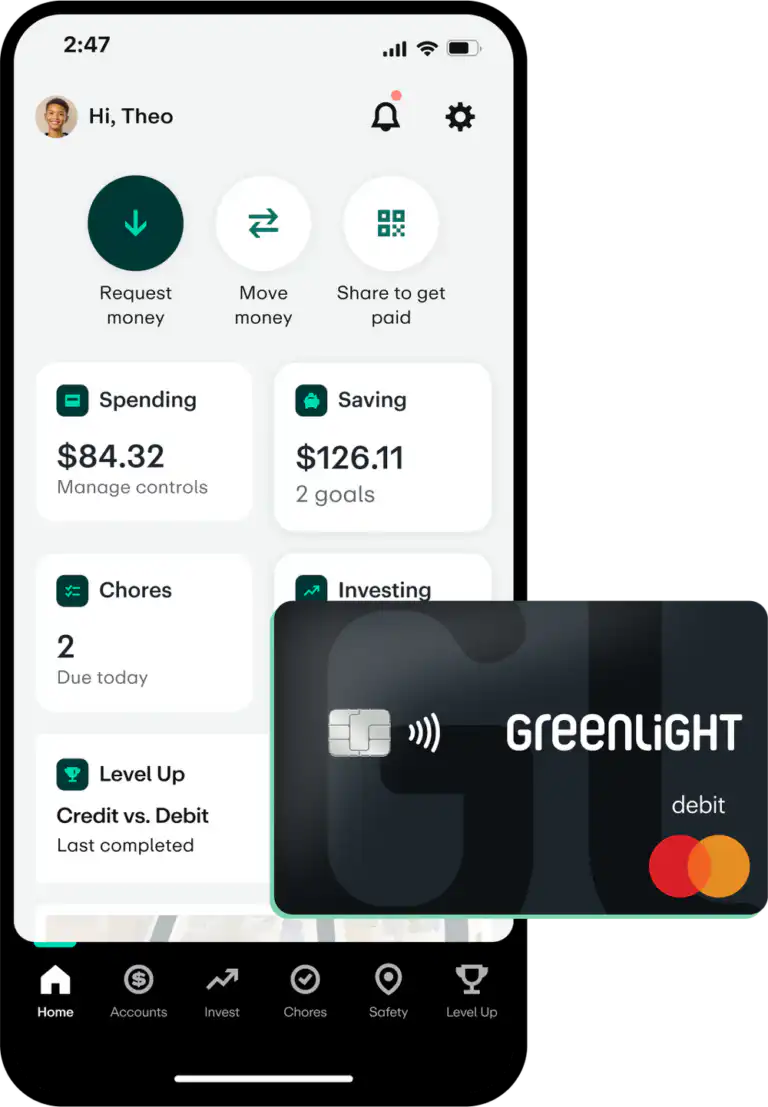
With Greenlight, kids earn money by finishing chores you set, then spend it with their own debit card, under limits you control. You pay for it with a monthly plan.
- What Sets It Apart: Greenlight pays a reward on kids’ savings itself, and Infinity adds crash detection and driving reports for teens
- APY: 2.00% a year on Core to 6.00% on Family Shield, on up to $5,000 per family; needs a linked bank account
- Rewards: 1% cash back on kids’ spending, paid monthly into savings, on Max and up
- Features: Chores and scheduled allowance; store and category blocks; real-time alerts; FDIC insurance through Community Federal Savings Bank
- Monthly Fee: $5.99 (Core), $10.98 (Max), $15.98 (Infinity), or $19.98 (Family Shield) for up to five kids; free with checking at some banks, such as U.S. Bank
- Cost: No Greenlight ATM fee; $0 to add money; no foreign transaction fee; $9.99 custom card
- Eligibility: No minimum age for kids
- Pros: Chores, allowance, and spending controls on the cheapest plan; One plan covers up to five kids; No Greenlight fees to add money, use ATMs, or spend abroad
- Cons: A monthly fee, unless your bank includes a Greenlight plan; Cash back and kids’ investing need the $10.98 Max plan; Savings rewards stop at $5,000 per family; ATM operators can still charge fees
For more information, read our full Greenlight Review.
This list gives each money job one app, along with what it costs and who pays for it. Install the one for the job costing you the most, and add another app only once you’re opening that one every week.
Compare the best budgeting apps to find one that fits how you budget, or the best round-up savings apps to save or invest your spare change.


Subscribe and we'll send you 101 Essential Money Tips to get you started.
The 101 money moves that matter most, from the foundations to protecting what you’ve built.
Advertiser Disclosure: Many or all of the offers that appear on this site are from companies that compensate us, and some companies pay for sponsored content. That compensation may influence which products we cover and where and how they appear on a page, including the order in which they appear. We do not include every company or offer available in the marketplace.